Hub Markdown Guide
How to write Hub Documents: standard Markdown, plus the small set of JWN/Hub-specific extensions layered on top of it — clearly separated, so you always know which is which.
Two Kinds of Syntax on This Page
This guide covers two genuinely different things, plus one that's a bit of both:
- Standard Markdown — the same CommonMark/GitHub-Flavored-Markdown syntax you already know from GitHub, Slack, Notion, and most other tools. Hub's renderer implements this faithfully, with a couple of specific behaviors called out under each feature.
- Mermaid Diagrams — a fenced code block written in ordinary, portable Markdown syntax (
```mermaid), but the rendering of its contents as an actual diagram is a Hub extension. Elsewhere, it just stays a code block. - Custom JWN Directives — syntax that only exists in Hub. Currently that's exactly one directive:
:::pagebreak.
Every example under Custom JWN Directives is labeled as such. Nothing in the Standard Markdown section is a Hub invention — if it's not in the directives section, it's ordinary Markdown that will work anywhere. Mermaid Diagrams sits between the two for the reason above, and is documented in its own section.
Standard Markdown
Hub renders document content with marked in GitHub-Flavored-Markdown mode, sanitized with DOMPurify before display. The same renderer is used everywhere a document's content appears — the Documents editor's live preview, revision history, public shares, and Test Link previews — so what you see in one is what you get in all of them.
Headings
# Heading 1
## Heading 2
### Heading 3
Renders as three heading levels, each progressively smaller — an actual live example isn't shown on this page since it would inject a competing heading into this guide's own document outline.
Hub notes: Every heading gets a stable, GitHub-style id (e.g. ## Getting Started becomes id="getting-started"), so you can link to it from elsewhere in the same document with [jump there](#getting-started). Duplicate headings get -1, -2, etc. appended automatically. Hub only styles heading levels 1–3 distinctly; deeper levels (#### and beyond) still render correctly but share the same visual weight.
Paragraphs and Line Breaks
First paragraph.

Second paragraph, after a blank line.
Renders as:
First paragraph.
Second paragraph, after a blank line.
Hub notes: This is the one place Hub's renderer deliberately differs from strict CommonMark. Standard CommonMark treats a single line break inside a paragraph as just a space, requiring two trailing spaces (or a backslash) to force a line break. Hub's renderer runs in GFM "breaks" mode instead: every single line break becomes a visible line break, matching how most people actually type in a plain-text editor (Slack, Notion, GitHub comments, etc. all behave this way too). If you want two lines to run together as one line, put them on the literal same line in the source, or remove the line break between them.
Bold and Italic Text
**bold text**, *italic text*, and ***bold italic text***
Renders as:
bold text, italic text, and bold italic text
Hub notes: Both **bold**/__bold__ and *italic*/_italic_ forms are supported, same as standard Markdown.
Links
[Hub](https://hub.justwhatsneeded.com)
Renders as:
Hub notes: Links to a heading in the same document use that heading's generated id — see Headings. Links always render with target behavior determined by the surface they're viewed on (editor preview vs. public share); the Markdown syntax itself is unaffected either way.
Images

Renders as an <img> tag with the given src and alt text. This guide doesn't embed a live example image since it would depend on an external URL staying reachable — the syntax above is exactly what to use.
Hub notes: Images are not uploaded into Hub itself — the URL must already be reachable on the public internet (or wherever the document's viewers are). There is currently no drag-and-drop image upload in the Documents editor.
Ordered and Unordered Lists
- Unordered item
- Another item
  - Nested item

1. First step
2. Second step
Renders as:
- Unordered item
- Another item
- Nested item
- First step
- Second step
Hub notes: Both - and * work as unordered bullet markers. Nested lists are indented with two spaces.
Blockquotes
> A quoted line.
> A second line in the same quote.
Renders as:
A quoted line.
A second line in the same quote.
Hub notes: Line breaks inside a blockquote follow the same "every line break is visible" behavior described under Paragraphs and Line Breaks.
Inline Code
Use the `resource` and `action` parameters together.
Renders as:
Use the resource and action parameters together.
Hub notes: Text inside single backticks is never interpreted as Markdown or as a JWN directive — see Escaping Special Characters.
Code Blocks
```
function greet(name) {
  return "Hello, " + name;
}
```
Renders as:
function greet(name) {
  return "Hello, " + name;
}
Hub notes: Content inside a fenced code block is always treated as literal text — including anything that would otherwise look like a JWN directive. A :::pagebreak line typed inside a fenced code block prints literally and never triggers a page break; see Page Break.
Horizontal Rules
---
Renders as:
Hub notes: *** and ___ on their own line also produce a horizontal rule, same as standard Markdown.
Tables
| Feature | Supported |
|---|---|
| Tables | Yes |
| Task lists | Yes |
Renders as:
| Feature | Supported |
|---|---|
| Tables | Yes |
| Task lists | Yes |
Hub notes: GitHub-Flavored-Markdown table syntax (pipe-delimited rows, a --- separator row). Column alignment markers (:---, :---:, ---:) are supported the same way GFM defines them.
Task-List Checkboxes
- [ ] Not done yet
- [x] Done
Renders as:
- Not done yet
- Done
Hub notes: Supported. In the Documents editor's own Edit/Preview, checkboxes are interactive — clicking one in Preview flips its state in the underlying Markdown source. Everywhere else the same content is shown read-only (public shares, Test Link previews, revision history), the checkboxes render but are disabled — clicking them does nothing, by design, since there's no logged-in author session to save a change through.
Escaping Special Characters
\*not italic\*, and a literal colon-colon-colon: \:::pagebreak
Renders as:
*not italic*, and a literal colon-colon-colon: :::pagebreak
Hub notes: A backslash before a Markdown special character (\*, \_, \`, \[, \], \#, \\, etc.) forces it to render literally instead of being interpreted. This also works for the JWN page-break directive — escaping its leading colons the same way prints the directive text literally instead of triggering a page break, which is how this exact sentence you're reading now avoided triggering one.
Mermaid Diagrams
A fenced code block whose language is mermaid renders as an actual diagram in Hub Documents, instead of a literal code block.
Source:
```mermaid
flowchart TD
    A[Draft the document] --> B{Ready to publish?}
    B -->|Yes| C[Publish]
    B -->|No| D[Keep editing]
```
Renders as:
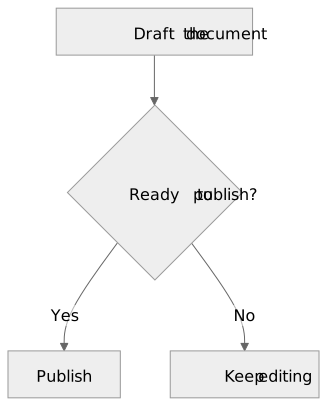
In a Hub Document, the Mermaid source above renders automatically as this diagram.
Hub notes:
- Mermaid rendering is a Hub extension layered on top of the standard fenced-code-block syntax above — the fence itself (
```, a language word, a matching closing fence) is ordinary Markdown that works anywhere. What's Hub-specific is that Hub recognizes themermaidlanguage and turns the block into a diagram instead of leaving it as literal text. - It works on every Hub surface that renders a document's Markdown for viewing: the Documents editor's own Preview, revision history, the public Share view, Print Preview, and the browser's own print/Save-as-PDF flow from there.
- The one exception is the dedicated Download PDF export (the server-side PDF file Hub generates directly, not the browser's own print dialog): it has no diagram engine available to it, so a
mermaidblock there falls back to showing its raw source as an ordinary code block — the same graceful fallback described below for other Markdown tools, not a bug. - Need to sketch or validate Mermaid syntax before pasting it into a Hub Document? The Mermaid Live Editor is a free, official tool for writing and previewing Mermaid diagrams in a browser. It's entirely optional — everything you need to write a working diagram in Hub is on this page — but it's a convenient place to check unfamiliar syntax first.
Troubleshooting Mermaid Diagrams
- The diagram must be valid Mermaid syntax. An invalid diagram doesn't fail silently — it shows a fixed message ("This diagram could not be rendered (invalid Mermaid syntax).") in place of the diagram. If you see that, check the source against the Mermaid Live Editor or the official Mermaid documentation.
- The opening and closing fences must match. Both need to be at least three backticks (or three tildes), and the closing fence needs at least as many characters as the opening one — see Code Blocks.
mermaidmust be the first word right after the opening fence —```mermaid, with no leading space and nothing else on that line.``` mermaid(a space before it) or plain```withmermaidon its own line won't be recognized, and the block just renders as an ordinary code block instead of a diagram.- After editing the diagram's source, switch to (or back to) the Preview tab to see the update. Hub Documents' editor doesn't live-render Preview on every keystroke — it renders when Preview becomes the active tab, so an edit made while Preview is already showing won't appear until you leave and return to that tab (or otherwise trigger a re-render, like a reload).
- Remember Mermaid rendering is a Hub extension, not portable Markdown behavior. A
mermaidfenced block copied into GitHub, Slack, Notion, or any Markdown tool without Mermaid support will just display as an ordinary code block showing the raw diagram source, exactly the same fallback Hub's own PDF export uses. That's expected, not broken.
Custom JWN Directives
This section is not standard Markdown. Everything below only works in Hub Documents — copying it into GitHub, Slack, or any other Markdown renderer will just show the literal directive text, since nothing else understands it.
Page Break — :::pagebreak
Forces the content immediately after it to begin on a new page when the document is printed or exported to PDF.
Source:
Content on the first printed page.

:::pagebreak

Content that always starts on a new printed page.
What it does:
- It is a JWN extension, not standard Markdown. No other Markdown tool recognizes this syntax.
- It forces the content that follows it to begin on a new page in printed or PDF output.
- On screen, it is invisible and adds no visible gap — it does not affect the normal reading layout of the document. (The one exception: in the Documents editor's own live Preview pane, it shows as a small, subtle "Page break" marker so you can see where it lands while writing — that marker itself never prints and never appears anywhere else.)
- It applies everywhere the shared Markdown renderer is used for read-only viewing: public shares, Test Link previews, and any other document view built on the same renderer.
- The directive line itself is never shown in rendered or printed output, under any circumstances — readers only ever see its effect (a page break when printing), never the syntax that caused it.
Recognition rules (what does and doesn't count as the directive):
- It must be the only thing on its own line —
:::pagebreakwith nothing else before or after it on that line (up to 3 leading spaces are tolerated, same as other Markdown block syntax). - It does not trigger inside a fenced code block — see Code Blocks.
- It does not trigger inside inline code (backticks) — see Inline Code.
- Anything that isn't an exact match — extra text on the same line, a different number of colons (
::::pagebreak), or a misspelling — is left alone and simply prints as ordinary text, exactly as typed. - To show the literal text
:::pagebreakwithout triggering a page break, escape it:\:::pagebreak— see Escaping Special Characters.
Do not expect any other three-colon keyword to do anything — :::pagebreak is currently the only implemented directive. This guide does not document speculative directives that don't exist yet.
Document Metadata
| Title | Hub Markdown Guide |
| Status | Canonical |
| Audience | Anyone authoring Hub Documents |
| Guide version | 1.1 |
| Last updated | 2026-08-17 |
| Canonical URL | https://justwhatsneeded.com/markdown-guide.html |
| Related guide | Hub API Guide |
| Purpose | Reference for standard Markdown support and JWN-specific Markdown extensions in Hub Documents. |
Keeping This Guide Current
This guide has one canonical source — docs/markdown-guide-source.md in the jwn-hub repository — generated into markdown-guide.html by scripts/generate-markdown-guide.php. Nobody edits html/markdown-guide.html directly; it is build output and gets overwritten the next time the generator runs.
The renderer this guide documents lives in a separate repository: assets/js/markdown-render.js in the Hub app repo (project-hub), shared verbatim by the Documents editor, revision history, public shares, and Test Link previews. If that renderer's behavior changes — a new directive, a change to an existing one, a change to which standard Markdown features it supports — update this guide (docs/markdown-guide-source.md) and regenerate before that work is considered complete.
The Mermaid Diagrams example's rendered image (html/markdown-guide-mermaid-example.svg) is a static asset, not build output — scripts/generate-markdown-guide.php doesn't produce it and won't regenerate it. It was rendered once from the exact source shown in that section, using the same vendored Mermaid engine and DOMPurify SVG sanitization the Hub app itself uses (assets/js/mermaid.min.js / assets/js/mermaid-render.js in the Hub app repo), since this guide page doesn't load Hub's Mermaid runtime and can't render the diagram live. If that example's Mermaid source ever changes, re-render html/markdown-guide-mermaid-example.svg to match before that work is considered complete — a stale image showing different source than the text above it would be worse than no image.
© 2026 Just What's Needed · Back to Hub overview